
How Call in Studio Works / FAQ
Multiple Call-in Numbers for One Show or Meeting
You may purchase multiple call-in numbers and assign them to a single show or meeting. Art Bell, host of Coast to Coast AM was famous for having multiple call-in lines (e.g., for "East of the Rockies," "West of the Rockies," etc.), which you can duplicate with Call in Studio. You can also have a toll-free and local number assigned to your show/meeting, a foreign number and a domestic number, or myriad other configurations.
Enabling multiple call-in numbers will also reveal additional options on your configuration page (go to My Shows and click on your show/meeting name). The 'Call-In #' section will also let you assign as Short Label and line descriptin. The lable must be 4 characters or less. Labels like 'L1' and 'L2' are common uses. The line description must be less than 100 characters to describe the line, which is displayed in some areas on the console.
Finally, a checkbox will allow you to 'Queue Calls by Number Dialed' (otherwise they are grouped together by Room Name).
When calls are grouped together, the label for the number dialed will display in front of the phone number for that call. See below:
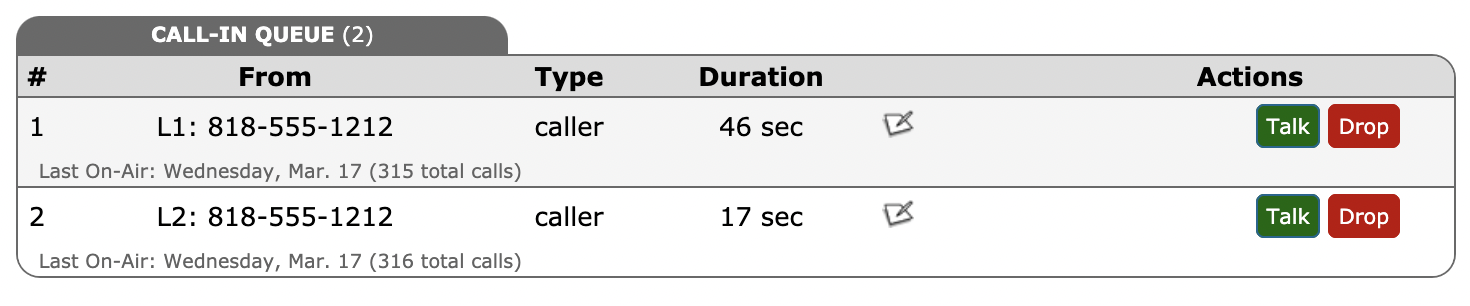
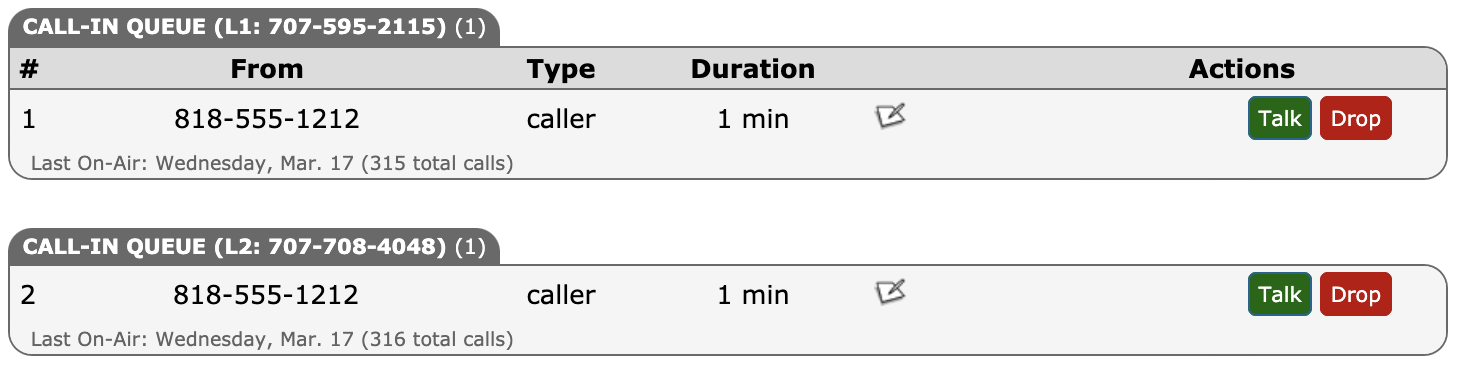
When calls are grouped by the Number Dialed, the label for calls in the Call Queue will be grouped by the Short Label (when they are moved to the HOST ROOM or any other queue room, the label will be displayed in front of the caller's number). For example:
Finally, the Max Calls value you select in setup applies to all calls to your show or meeting, regardless of the number dialed. (Max Calls is the maximum number of callers allowed to simultaneously connect to your call-in lines, regardless of the call-in number dialed. When the queue is full, new callers will receive a busy signal until there is room in the queue.)
• How Do I Authorize Guests, Hosts, or Screeners by Caller ID?
NEXT QUESTION
• What Is a Call-In (Listen Only) Line?
Question & Help Index
Connecting to Your Show/Meeting
- How Does It Work?
- Connecting the Host Line
- Video Host Overview
- Using Zoom and Similar Services with Call in Studio
- Using RØDECaster with Call in Studio
- How do I use OBS to stream my show to YouTube using Call in Studio?
- I'm looking for an all-in-one solution like Blog Talk Radio, what do I do?
- WebRTC: Host & Screener Connection
- Where's the Tutorial Setup Video?
- Couldn't I just use Google Voice/a cell phone to take calls?
- Why Do I Need a Custom Call-In Number?
- Can I Receive SMS/Text Messages?
Managing Your Show
- What Does the Host's Call Management Screen Look Like and How Does It Work?
- Does Call in Studio Support Call Screening? What is Auto-Screening?
- What is the Difference Between a Call-In Line and a Guest Line?
- Can I Put More Than One Caller or Guest On-Air at the Same Time?
- How Do I Host Multiple Shows? Do I Need Multiple Phone Numbers?
- How Do I Manually Sort Calls in the Queue?
- Can I Block or Limit Certain Callers?
- Can I Record My Show or Meeting?
- Can I Accept Voicemails When I'm Not Accepting Live Calls?
Advanced Features
- Professional Monthly Billing
- Can I Customize the Phone Prompts Callers Hear on My Show or Meeting?
- Can I Allow Other Users Access to My Show/Meeting (to Host or Screen Calls)?
- How Do I Authorize Guests, Hosts, or Screeners by Caller ID?
- Multiple Call-in Numbers for One Show or Meeting
- What Is a Call-In (Listen Only) Line?
- WebRTC: Connecting Callers Through our Web Interface
- WebRTC: Call Rates
- Host Callback Mode: Auto-Connecting the Host Only When Callers Are Present
- Raise/Lower Hand for Callers and Guests on Hold
- What is Mix-Minus, and Does My Mixer Board Support It (Or: Is there a Mix-Minus Software Solution)?
Miscellaneous Questions
- What Browser Works Best With Call in Studio?
- Can I Port or Transfer a Number Into or Out of Call in Studio?
- How Do I Delete A Show or Meeting?
- How Does Auto-Recharge Work?
- Are there any time limits to my show/meeting or phone calls?
- How do I cancel / close my account?
- I Have More Questions / Need Help!